The modern job search is such a massive pain.
The level of information availability we have today is a double edged sword. It's great that so many platforms exist where people can post jobs, but it's easy to drown in it and miss out on opportunities. I've experienced this information overload myself, scrolling through job postings until my eyes were glazed over and my brain wasn't even processing the words.
Luckily, LLMs are exceptional at the kind of work involved in a job search: reading large volumes of text, extracting structured information, and making consistent judgments against defined criteria. All we need is some connective tissue (n8n) and we can let AI do the work for us, preserving capacity for the things that really matter.
That's what this article is about. I built a workflow that searches LinkedIn daily, evaluates every new posting against my resume and career goals, scores each one on fit and likelihood of success, and delivers a prioritized report to my inbox every morning. What used to take hours per week now takes minutes. And, powerfully, I respond to strong matches within 24 hours of their posting with a fresh brain.
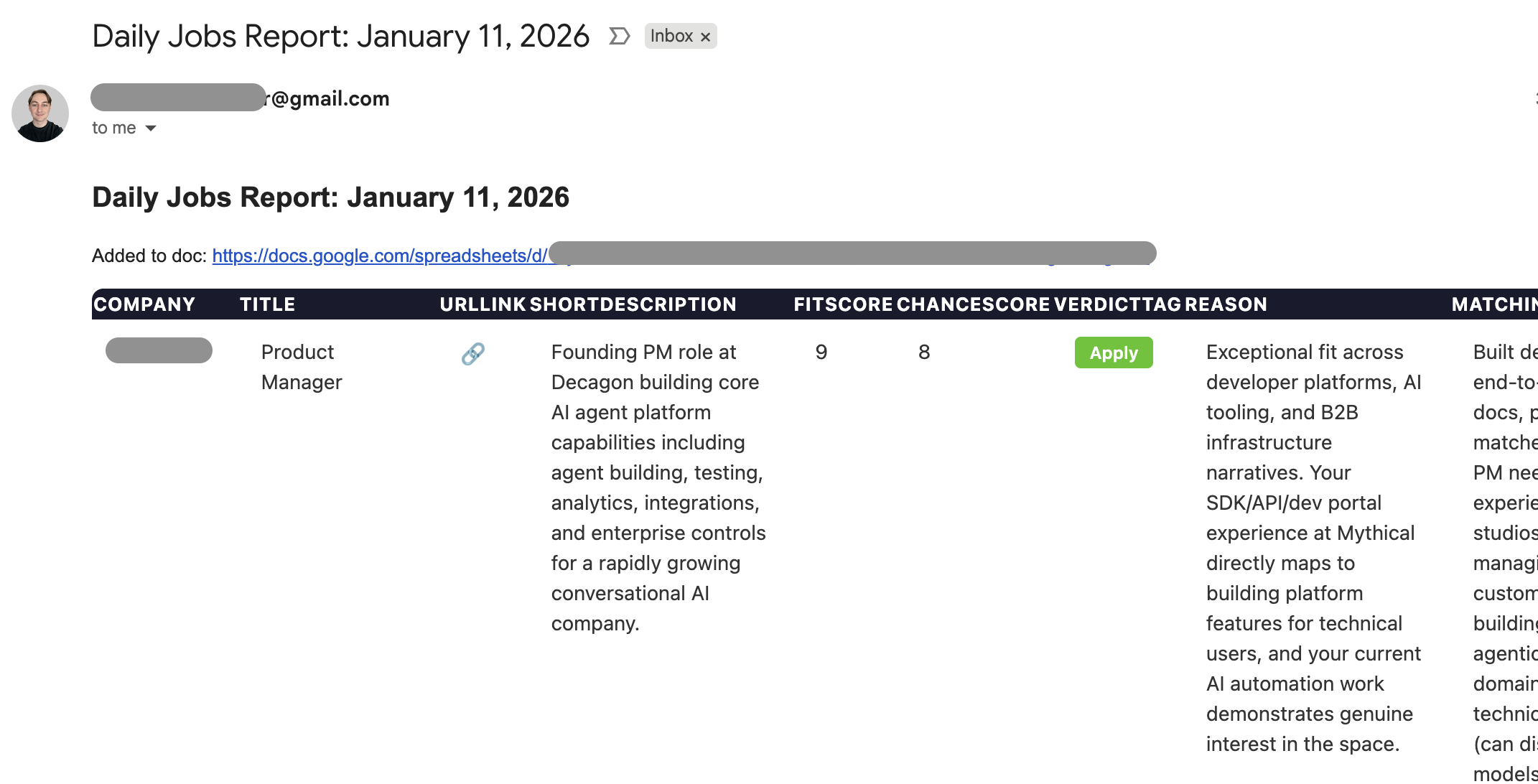
I'll walk through exactly how it works and what I learned building it.
Why This Matters
Before we get into the technical details, I want to frame why I think this matters.
There's a widening gap between people who use AI for one-off tasks and people who build AI-powered systems. The first group asks ChatGPT to rewrite their resume bullet points. The second group builds pipelines that continuously process information and take action on their behalf. The productivity difference isn't incremental. It's an order of magnitude.
The job search workflow I'm about to share is one example. But the pattern applies everywhere: monitoring competitors, processing customer feedback, qualifying leads, summarizing research. Any task that involves reading lots of text, applying judgment, and producing structured output is a candidate for this kind of automation.
The tools to build these systems are more accessible than ever. n8n is open source, built on LangChain, and has native integrations with every major LLM provider. But the LLM integrations aren't even the important part. n8n connects to everything: Gmail, Google Sheets, Slack, Notion, Airtable, hundreds of apps out of the box. And when a native integration doesn't exist, you can write custom code nodes or raw HTTP requests to hit any API you want.
This is the trajectory we're on. The walls between applications are coming down. Your tools will talk to each other, orchestrated by AI that can read, reason, and act. The people who learn to build these workflows now will have a massive advantage as the ecosystem matures.
The Problem
There's a few pain points I was experiencing that I set out to solve with this automation.
- Volume: A single LinkedIn search for "Product Manager" returns thousands of results. Scanning titles and company names isn't enough to assess fit. You have to click into each posting, read the full description, and evaluate it against your background. That's cognitively expensive. So you either rush through it and apply to bad fits, or you burn out and miss good ones.
- Judgement: When you're energized, you talk yourself into roles you shouldn't pursue. When you're tired, you dismiss roles worth exploring. Consistency is hard with such a burdensome task. When just reading, I wasn't being systematic enough with how I evaluated job descriptions.
- Velocity: The best roles get hundreds of applications within days. If you're only reviewing postings once a week, you're already buried under a pile of applicants by the time you find them.
Each of these problems has a solution if you throw the right tool at it.
The System
Here's the workflow I built in n8n. It runs daily on a schedule and requires zero manual intervention.
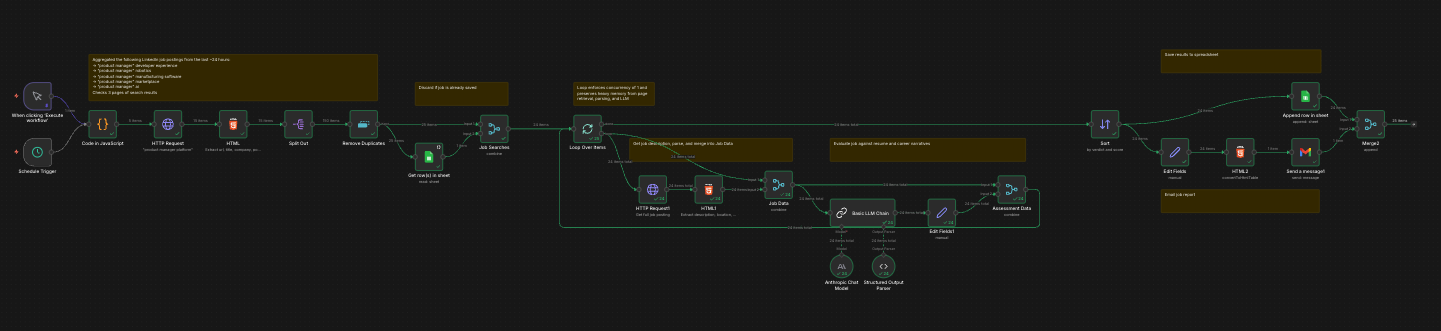
Stage 1: Discovery
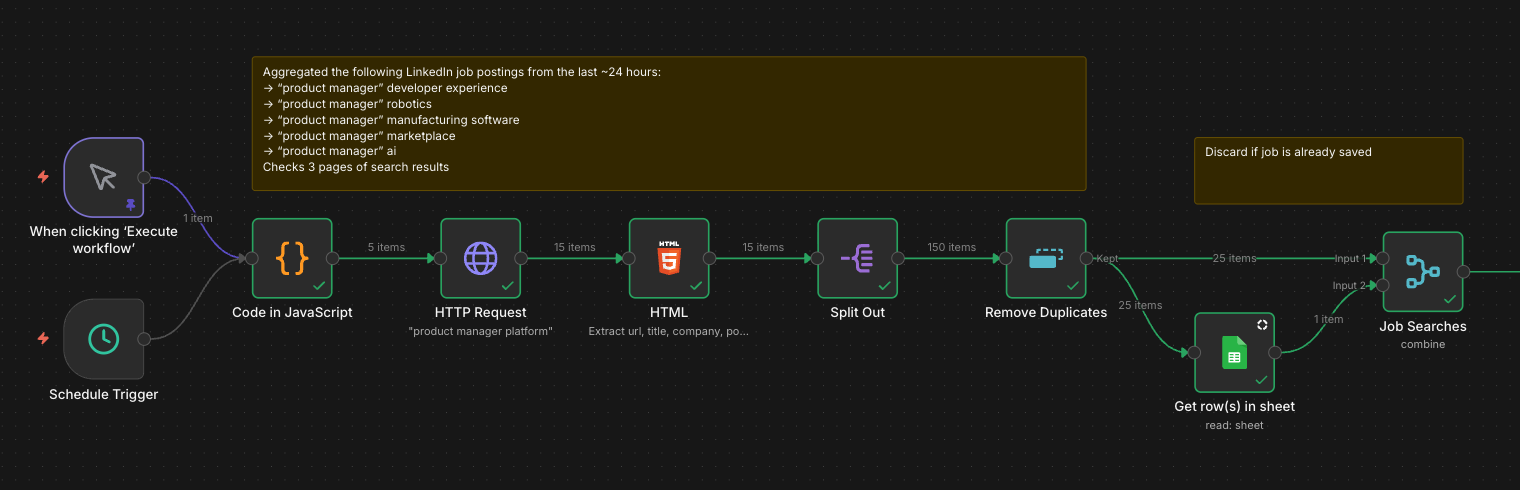
The workflow starts with a scheduled trigger that fires every morning. A JavaScript node generates five targeted search queries based on domains I care about: "product manager" combined with developer experience, robotics, manufacturing software, marketplace, and AI. This is more effective than a single broad search because LinkedIn's relevance ranking improves with specificity.
For each query, an HTTP request hits LinkedIn and pulls the first three pages of results. An HTML parser extracts the URL, title, company, and posting date for each listing. A typical run surfaces around 150 raw results.
Those results flow through two filters. First, a deduplication node removes listings that appear across multiple searches. Second, the remaining jobs are cross-referenced against my Google Sheet of previously processed postings. Any job I've already seen gets discarded. What remains are net-new opportunities, usually 20 to 30 per day.
Stage 2: Evaluation
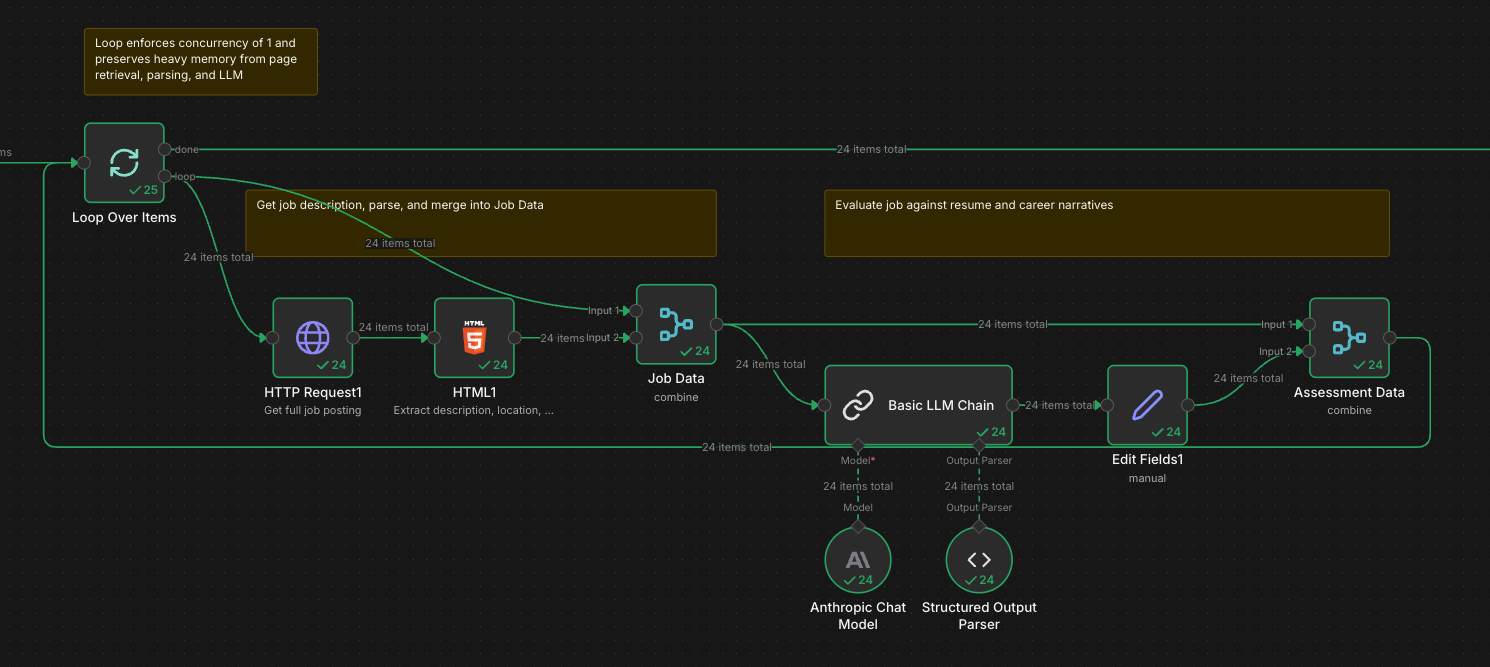
This is where the LLM does the heavy lifting. For each new job, the workflow fetches the full posting page, parses out the complete description and metadata, and sends it to Claude via Anthropic's API.
The prompt is the most important part of the system, so I spent real time on it. I feed Claude my full resume, a set of "career narratives" describing the types of roles I'm targeting, and the job description. I ask for a structured assessment with six fields:
fitScore (1-10): How well does this role align with my background and career interests?
chanceScore (1-10): Realistically, what are my odds of getting an interview given what this company is likely looking for?
verdict: "Will Apply" or "Will Not Apply"
reason: A one to two sentence explanation.
matching: What strengthens my case for this role.
gaps: What weakens my case.
The dual-score system is important. A role might be a perfect fit for my interests but a long shot given my background (high fit, low chance). Or it might be an easy win that doesn't excite me (low fit, high chance). Seeing both scores helps me make better decisions about where to invest time.
The prompt also includes explicit instructions to be realistic and direct. I don't want the LLM to be encouraging. I want it to save me from wasting time on applications that won't go anywhere.
Here's a sanitized version of the prompt structure:
## Task
You are helping me review job descriptions against my resume to determine if I should apply.

You will assess:
- fitScore: Think about my background and career narratives against the job description. Is this a fit for my career growth and interests? Score 1/10.
- chanceScore: Get inside the minds of the org. Think about what their recruiters and hiring managers are looking for. What chance do I have of getting invited for an interview? Score 1/10.
- verdict: Either "Will Apply" or "Will Not Apply"
- reason: A concise 1-2 sentence explanation for the verdict.
- matching: Things that strengthen my argument for the role.
- gaps: Things that weaken my argument for the role.

Be realistic and direct. You're helping me process a large volume of roles and apply to ones that are the best fit with a real chance of success. I don't want to waste my time.

## My Resume
[Full resume text]

## My Career Narratives
[Descriptions of 4-6 target role archetypes with context on why I'm a fit]

## Job Description
[Parsed from the posting]
The career narratives section is worth explaining. Rather than just sending my resume, I wrote short paragraphs describing the types of roles I'm targeting and why my background makes me a fit. For example, one narrative covers "Developer Platforms & APIs" and explains that I built a B2B developer platform end-to-end, making me a strong fit for developer tools, API products, and SDK teams. Another covers "Industrial & Physical Systems" and references my six years designing robotic manufacturing systems before becoming a PM.
These narratives give the LLM better context for evaluation than the resume alone. They surface the story I'm trying to tell, not just the facts.
A structured output parser ensures Claude returns clean JSON that flows into the next stage without manual cleanup.
Stage 3: Output
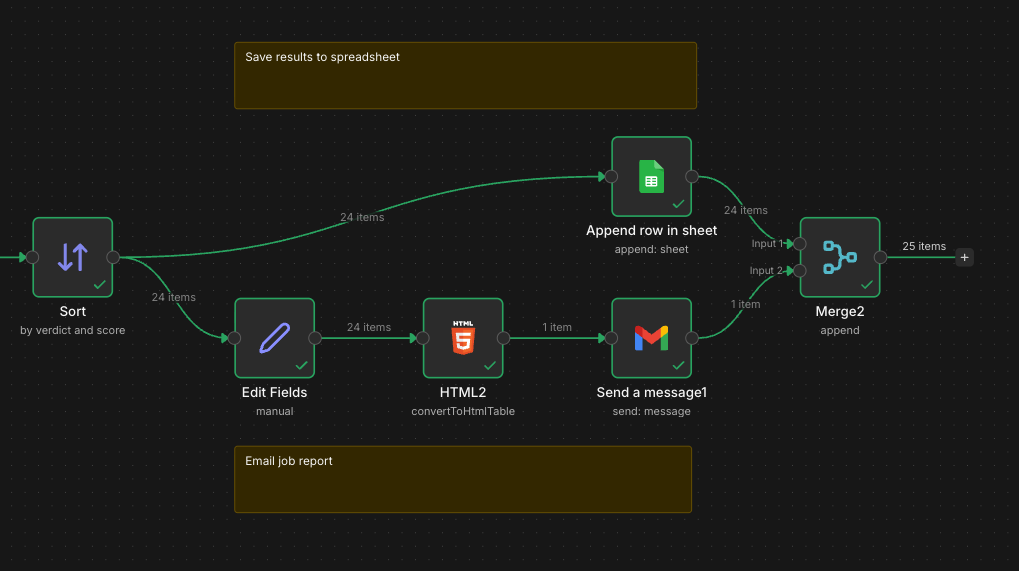
The evaluated jobs get sorted by verdict and score, then split into two parallel paths.
One path appends each job to a Google Sheet that serves as my running database. The sheet tracks company, title, salary range, Claude's assessment, application status, and outcome. Over time, this becomes a dataset I can analyze to understand what's working.
The other path generates an HTML table and emails it to me as a daily digest. I wake up to a prioritized list of opportunities, sorted by the ones most worth pursuing. Strong matches get my attention immediately. Weak matches get archived for reference but don't consume my morning.
What I Learned Building This
Anthropomorphize your LLM. This sounds silly, but it's the most useful framing I've found. When you're writing a prompt, imagine you're giving instructions to a smart person who has never met you. What context do they need to do the job well? What would they misunderstand without explicit guidance? The career narratives section exists because I noticed Claude wasn't catching certain fits that seemed obvious to me. It couldn't read my mind about why my manufacturing background made me interesting for robotics roles. Once I wrote that context down explicitly, the assessments got dramatically better.
Prompt engineering is product design. The quality of the output is entirely dependent on the quality of the prompt. I iterated dozens of times before landing on the current version. The dual-score system (fit vs. chance), the explicit instruction to be realistic, the structured output format: none of these were obvious from the start. They emerged from watching the LLM produce mediocre assessments and asking myself what was missing.
The system reveals your own priorities. Building this forced me to articulate what I actually want. Writing the career narratives made me think carefully about which roles I'd be excited about versus which ones just sound prestigious. The LLM can't evaluate fit if you haven't defined what fit means. That clarity has value beyond the automation.
One tactical note if you're building something similar in n8n: memory management matters. Fetching full job posting pages is heavy, and n8n runs in a constrained environment. Early versions of my workflow crashed because I was passing too much data through the flow. The fix was implementing a loop with concurrency of 1 and being disciplined about only forwarding the fields I actually needed downstream.
The Takeaway
This article is about job searching, but the real point is broader. We're in a moment where the ability to build automated systems using LLMs is a genuine competitive advantage. Not because the technology is magic, but because it lets you operate at a scale and consistency that manual effort can't match.
The gap between "uses AI" and "builds with AI" is where leverage lives. The tools are accessible. The barrier is learning to see your problems as decomposable workflows and having the patience to build and iterate until they work.
If you're job searching, maybe this specific workflow is useful to you. If you're not, the pattern still applies. Find a task that involves processing volume, applying judgment, and producing structured output. Build a system. Iterate until it works. Then move on to the next one.
That's how you compound productivity instead of trading time for output.
Try It Yourself
The workflow along with instructions to use are available here:
https://github.com/matthew-h-cromer/n8n-job-search-automation
Leave a Private Comment
Your comments are private and only visible to me.
Select any text above to comment on a specific passage, or use the form below for general thoughts.